Ok ok, I know what you’re thinking. You still use Dreamweaver!? The quick answer is: I use the tool that fits the job when I need it. So yes sometimes!
For everyday coding, I use Sublime Text, but on some days when I need quick FTP access to make an update, I will hop into Dreamweaver (The source formatting is killer too!). I know you’re asking, you still use FTP? On some days yes.
Anyway, on occasion, I will open Dreamweaver and need to remove blank lines after formatting the source code. As a quick note to myself and to share with everyone else that might be looking to perform the same task I thought I would do a quick post.
The following is a quick and easy way to remove extra line breaks in Dreamweaver using find and replace along with some quick regular expressions:
- Open the Find/Replace box (CMD+F / CTRL+F)
- In the Find enter: [\r\n]{2,}
- In the Replace enter: \n
- Check the box “Use regular expression” and un-check any other boxes.
- Then hit “Replace All”
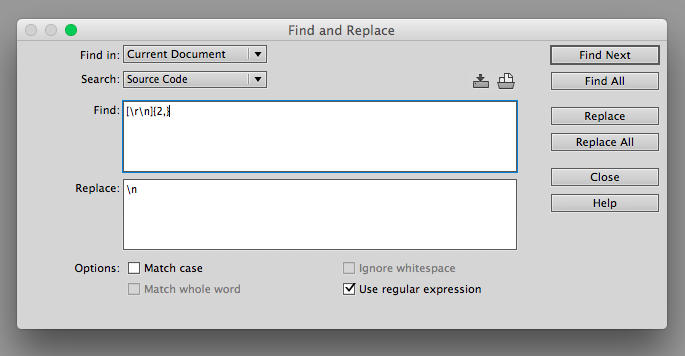
And that’s it! All the line breaks and empty lines will be gone.
I hope you’ve found this quick tip useful!
Leave a Comment