Everyone’s building custom skills for their AI coding assistants right now. Commit helpers, linting rules, project scaffolding. Little markdown files that make Claude Code do things your way instead of the default way. I’ve been doing the same thing. But the more skills I wrote, the more I wanted them to follow me between machines and projects without copy-pasting files around.
So I built a personal marketplace. A private GitHub repo that acts as my own skill distribution system. I install it on a new machine, pick the skills I want, and everything works the way I expect it to. No setup rituals, no re-explaining how I like things done.
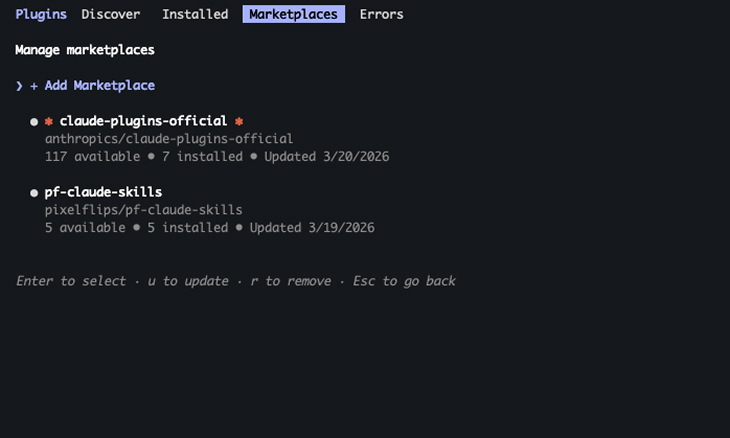
Here’s what that looks like and why I think more people should be doing this.
Same session, different day
Some skills are universal. I want my commit format everywhere. Others only matter in context, like how my Obsidian vault is structured or where session logs go. And I keep moving between machines, so anything stored locally is one laptop swap away from gone. The universal stuff needs to be portable. The project-specific stuff needs to stay out of the way when it’s not relevant.
Claude Code has memory and CLAUDE.md files that help with some of this. But there’s a gap between “remembering facts” and “knowing how to do something your way.” Memory stores that you prefer conventional commits. A skill actually enforces the format, stages the right files, and asks you to confirm (or not) before committing. One is a note on a whiteboard. The other is a workflow.
That distinction matters. The more workflows you encode, the less prompting you do. And the less prompting you do, the more time you spend on the actual work.
Your repo is the marketplace
The setup is almost comically simple. Anthropic added plugin and marketplace support to Claude Code, and all it takes is a GitHub repo with a marketplace.json file and a folder per plugin. Each plugin contains a SKILL.md markdown file with instructions that Claude loads when the skill triggers. That’s the whole thing.
Here’s what the structure looks like:
your-marketplace/
├── .claude-plugin/marketplace.json
└── skills/
    ├── your-skill-one/
    │   ├── .claude-plugin/plugin.json
    │   └── skills/your-skill-one/
    │       └── SKILL.md
    └── your-skill-two/
        └── ...
You register it as a marketplace in Claude Code, install whichever plugins you want, and they show up as slash commands. On a new machine, you add the marketplace and install your skills. Done.
The skills themselves are just instructions. There’s no SDK, no special syntax. You write what you want Claude to do in markdown, and it does it. If you can write a good prompt, you can write a skill.
What I built in a weekend
I’m not going to walk you through how to build each one. But I want to give you a sense of the kinds of workflows you can turn into skills, because the range is wider than you’d expect.
Vault setup. I use Obsidian as a personal knowledge base. This skill scaffolds the entire vault structure on a new machine. Directories, templates, config files, and the CLAUDE.md that tells Claude how to navigate the vault. I run it once per machine and never think about it again.
Session saving. At the end of every coding session, Claude automatically saves what happened to my Obsidian vault. Plans updated, decisions made, lessons learned, files changed. It appends to the project’s notes, writes a dated session log, and does it without me asking. I added an instruction to my global CLAUDE.md that tells Claude to invoke this skill at the session end. It just happens now.
New project. When I start a new project, I say “new vault project,” and Claude creates a folder from a template. plan.md for goals and status, notes.md for decisions and learnings, a sessions directory for logs. Consistent structure across every project without me remembering what goes where.
Conventional commits. I wanted Claude to use a specific commit format: type(scope): message. Not a linter, not a git hook. Just Claude, knowing how I commit and doing it right every time. The skill checks the diff, proposes a message in the right format, and waits for me to confirm. Forty lines of markdown replaced a tool I would have had to install, configure, and maintain.
Blog post research. I decided to write more this year, and this skill has made it easier to stick to. It lets me bounce topic ideas off something, searches for what’s trending in my area, suggests angles I might not have considered, and pulls together an outline I can react to. When a post is ready, it even publishes a draft straight to my WordPress site. Saves me an hour of tab-hopping before I’ve even started writing.
Those are just a few from my marketplace. All markdown. All in one repo. But they cover enough ground to show what’s possible.
The compound effect
The interesting thing isn’t any single skill. It’s what happens when they stack.
Claude saves my session, which means next time it can read what happened last time. It uses my commit format, which means I never review a commit message, wondering what format to use. It knows my vault structure, which means every project starts the same way and every session ends with a clean log.
Each skill removes one more thing I used to do manually. And because they’re all in the same marketplace repo, I can install the full set on any machine in about two minutes.
I’ve been thinking of it like this: most people configure their AI tools. Preferences, settings, maybe a CLAUDE.md file. That’s fine. But building skills is a different thing entirely. You’re teaching the AI how you work, not just what you like. The more you encode, the less friction there is between having an idea and executing it.
Maybe you should, too
I’m not saying everyone needs five custom skills and an Obsidian vault. But if you use an AI coding assistant daily and you keep repeating yourself, you already have the raw material for a skill. That commit format you keep correcting? That’s a skill. How do you structure new projects? Skill. The thing you do at the end of every session that you keep forgetting? Definitely a skill.
The whole point of working with AI is that it’s programmable. Not in the traditional sense. You don’t write functions and import libraries. You write instructions in plain language, and the AI follows them. If you’re going to use these tools every day, you might as well build the workflows that make them actually yours.

The marketplace angle is interesting because packaged Claude Code skills can hide real usage costs behind a simple deliverable. For builders productizing these workflows, it is worth estimating prompt length, repeated context, cache reads and writes, and batch pricing before deciding how to price or scope each skill.