At some point, I stopped knowing what was on my Mac. A tool here, a dependency my agent dropped in there. Collectively, a mystery. I was losing track. To help, I created stockpile.
Not all at once. It was gradual. A tool I installed to try out six months ago. A dependency that an agent dropped in to get something working. A gem that showed up on a backup restore from a machine I barely remember using. Each one was perfectly reasonable at the time. Collectively, a mystery.
I had no idea what was actually installed on my computer, and for a while, I just lived with that.
It wasn’t always agents
Package sprawl is older than AI. It starts the minute you follow a tutorial that tells you to npm install -g do something you’ll use once and never think about again. Then you restore from a backup without auditing what came with it. A new language ecosystem enters your workflow and brings its own installer, its own conventions, and its own quiet list of things it decided you need.
The problem isn’t that packages get installed. It’s that there’s no master list. No single place to go and say: here’s everything, where it came from, what it does, and whether I actually still need it.
AI agents made this worse. Genuinely worse. Not because they’re doing anything wrong (they’re doing exactly what you asked), but because they move fast and they install quietly. You tell an agent to get something working, and it will, and three deploys later, you’re staring at a global npm package you don’t recognise and trying to remember which conversation put it there.
Too many managers, zero answers
On a Mac, the actual audit goes something like this. You check Homebrew. Then casks. Then, the global npm packages. Then pip. Then Ruby gems, and by the way, are those system gems or gems you installed? Then Cargo binaries. Then the Mac App Store, which technically has a command-line interface if you know where to find it.
A lot of package managers. Different commands, different output formats. At no point do they talk to each other.
I kept a mental model of my machine that was somewhere between optimistic and wrong. I’d run brew list, feel briefly in control, and then remember I hadn’t checked npm in months. It wasn’t a workflow. It was archaeology.

A weekend and an idea
Here’s what I want to say about AI that I don’t say enough: it has genuinely changed what one person can build alone in a short stretch of time.
Stockpile was a back-burner idea for a long time. The kind of thing where you know exactly what you want, you can picture how it should work, and you also know it’ll take longer than you have. So it sits there.
This one didn’t sit. I built it in a weekend. Not because AI wrote it for me. I made every architectural decision, debugged every edge case, and argued with the output constantly. But the friction that usually kills side projects before they start just wasn’t there. The gap between “I want this thing to exist” and “this thing exists” is closing in a way that’s hard to overstate if you build things on your own.
That part still surprises me, honestly.
So I built the thing
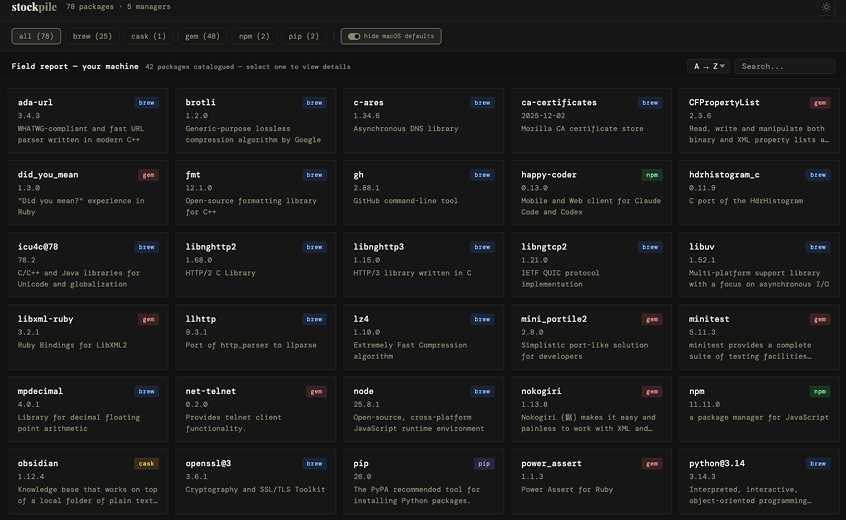
Stockpile is a bash script. You run it once. It scans all seven package managers, assembles the results, and opens a browser-based dossier of everything on your machine: every package, every version, install paths, descriptions, and run commands. No server. No account. Nothing leaves your machine.
That last part mattered to me. There’s no reason a tool like this needs a cloud component. Everything is local. The name felt right, too: a stockpile is yours. You should know what’s in it.
I built it because I needed it. I use it now. And it turns out the first time you run it and see everything laid out in one place, the feeling is somewhere between satisfaction and mild alarm.
You’ll find things you forgot about. Probably some things you don’t recognise. Maybe a few things your agents installed that you never explicitly asked for.
It’s free and open source. If your machine needs an audit, stockpile is ready when you are. I’d genuinely love to know what you find.
Leave a Comment